Set up Hugo and Github actions
TL;DR
Hugo is a powerful static blog generator, Github pages can host a static website from a github repository, Github actions can trigger automation based on commits. It is like those three things were made to come together.
Hugo
Hugo is a powerful static blog generator written in Go. It has great features, great themes and a large community, so when I was looking for a static website generator I didn’t look further.
The Get-Started bit
The standard way of running hugo is:
- Initialise your Hugo site and create a new repository for your blog
hugo new site MySite
cd MySite
git init
- Install a theme
git submodule add https://github.com/budparr/gohugo-theme-ananke.git themes/ananke
Now two things:
- the theme is recommended to be installed as a submodule.
- I personally cloned the theme to allow personal tweaks but also to track changes separately from the upstream repo.
You can find my cloned theme here. It’s a clone from https://github.com/luizdepra/hugo-coder, which I think looks amazing.
- Add content and render your website
hugo new posts/my-first-post.md
# edit the content/posts/my-first-post.md
hugo server -D # will run a local website and continuously refresh the content
- Generate your static website.
hugo -D # all content is created in ./public/
- Now what?
You’re meant to take all files in the public directory and copy it into your web server, ready to serve requests. Typically you’d use SFTP, or upload the content to S3 using static pages.
GitHub
Github Pages
Github has been offering web hosting as part of its free tier for a long time.
In a nutshell, the content of the git repo is exposed statically in a web server under your <account_id>.github.io.
There’s just about a million posts from various people about how to use them. To name a few:
- Hugo and hosting pages on github
- A blog post about getting started by Scott Vinkle
- Same from Matt West at Treehouse
You get the idea.
Github action
That’s where things get really interesting. Github Actions was introduced by Github not too long ago. It’s got a free tier, providing you run your automation on linux and you’re not hammering their servers.
Again, plenty of tutorials and excellent documentation online. The gist of it is:
- CI/CD configuration stored in a
.githubdirectory as YAML or JSON - “Actions” are essentially off-the-shelf containers (rebuilt or generated at run time), you can pick some from the market place or come up with your own.
- Integration with the github UI, get quick feedback on commits, push or PRs.
Set up
Git
The various repositories used in this setup are listed as follow:
- A repository containing the hugo sources.
- A repository cloned from upstream as a hugo theme
- A repository containing the static website (Github pages)
Both theme and website repositories are set up as submodules from the main hugo sources one. The reason behind this is to make it easy to automate it from github action that is very single repository centric.
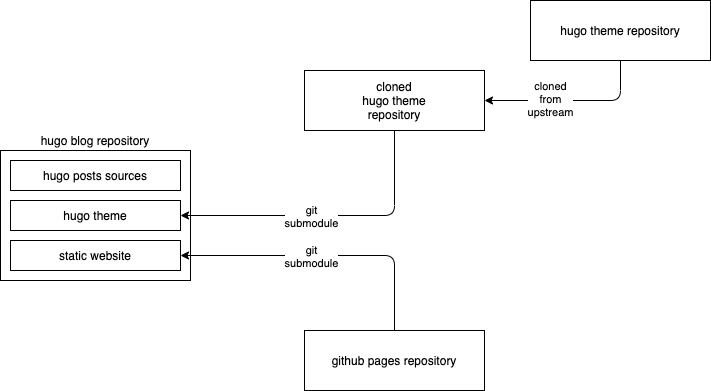
It makes it pretty easy to tie in Hugo sources changes with the website rendering and the theme used during the website production.
GitHub action
The Github action is triggering on push and follows a relatively straightforward path, that is:
- Checkout, + submodules
- Remove the old generated static website
- Generate the new website
- Push new website content
- Update new website revision on master repo
You can find the gist of it here: